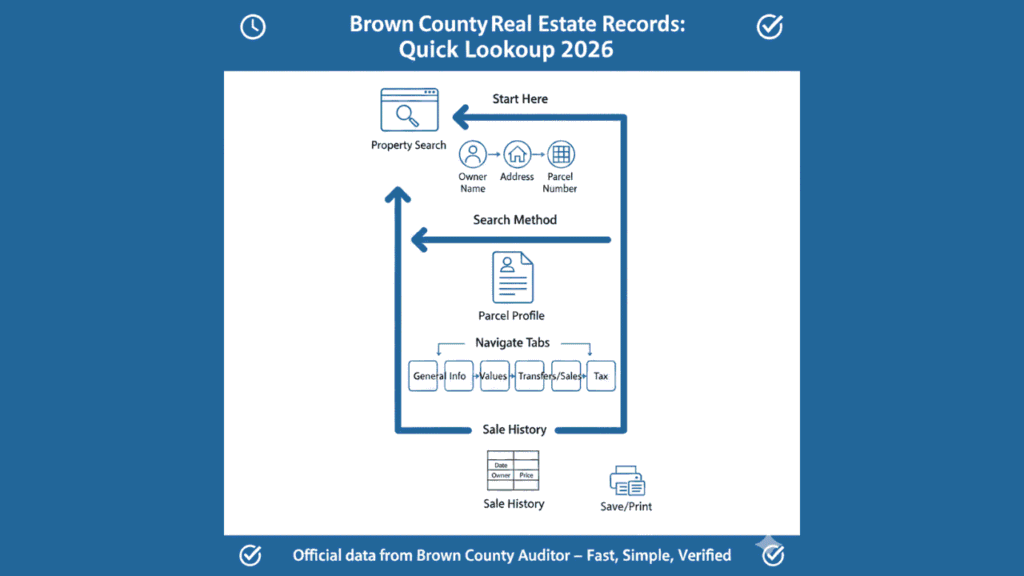
Opening a county website should not feel like stepping into a maze. Most people arrive at the Brown County property portal with one simple goal: find a property and see real, official details. Instead they meet unfamiliar fields, technical terms and a layout that feels frozen in time. You do not want a lesson on real estate. You want the record. You want it quickly, clearly and without guessing. This guide walks you through the exact path, using plain language, so you can reach the right page, enter the right information and get what you came for. Every step is practical. Every instruction is written for someone with zero technical background.
Why This Lookup Matters
Brown County real estate records are not casual information. They are used for buying homes, verifying ownership, reviewing taxes, and settling family matters. When a listing seems unclear or a parcel does not appear, everything slows down. Buyers hesitate, sellers wait, and simple planning turns stressful. The Auditor’s system is the official source for this data, and it is the same foundation used by local offices and professionals.
What most people struggle with is not the data itself but the way it is presented. The system was built for administration, not comfort. Once you know where to start and how to move through it, the process becomes predictable. This guide exists so you do not waste time clicking blindly. It gives you a clear path from search to result, without unnecessary theory or distractions.
Start Here: The Only Official Page
Every search begins at the Brown County Auditor’s official website:
From the homepage, look for a link labeled “Property Search,” “Real Estate,” or “Parcel Search.” The wording may change slightly, but it will always be under the Auditor’s section. When you click it, you enter the county’s real estate records system. You are in the right place when the page header shows “Brown County Auditor” and you see fields for Owner Name, Address, or Parcel Number.
This is not a third-party service. It is the county’s own database. The records displayed here come directly from public filings and internal updates. Bookmark this page. It is your permanent starting point for every Brown County property lookup.
Searching Without a Parcel Number
Most people do not know a parcel ID, and the system is designed to work without it. You can find any property using normal information.
When searching by owner name, enter the last name first. Using “Miller” instead of “John Miller” often works better because names are stored in different formats. Shorter entries return broader results and reduce the chance of missing a record.
When searching by address, use only the house number and street name. Avoid apartment numbers, unit letters, and street suffixes. Typing “412 Oak” is more reliable than “412 Oak Street Apt B.” The database matches base street data more accurately than full mailing formats.
Parcel number searches are exact. They are useful only when you already have a verified ID from a tax bill or deed. One incorrect digit will return nothing, so use this method only when necessary.
Understanding the Interface
The Brown County property portal was built for accuracy, not appearance. Pages reload instead of sliding. Buttons are small. Labels are technical. None of this means you are doing something wrong. Think of the system as a filing cabinet rather than a modern app.
After searching, you see a results list. Each result links to a parcel profile. That profile is the central record for that property. From there, you move between sections using tabs or side links such as General Information, Values, Transfers, and Tax. Each tab shows a different view of the same official record.
Avoid using your browser’s back button unless necessary. Use the system’s own navigation. Every click keeps you inside the same government record, just in a different category.
What the Fields Actually Mean
Property records use administrative language because they support county operations. You only need to understand a few core terms to read them confidently.
A “Deed” is the document that transferred ownership. “Assessed Value” is the county’s tax valuation, not the market price. “Lot Size” or “Acreage” shows how much land the parcel contains. “Land Use Code” classifies the property, such as residential or agricultural. “Ownership History” lists previous owners and transfer dates.
You may also see building details, year built, and structure type. These fields exist for taxation and planning. They do not guarantee condition or legality. Read them as summaries of what the county has on file, not as promises about the property.
Finding Sale History in Under Two Minutes
If your goal is only to see when a property sold and for how much, you can ignore most of the page. After opening a parcel, locate the tab labeled “Transfers,” “Sales,” or “Ownership History.” Click it once and scroll.
This section shows recorded ownership changes. Each entry typically includes a transfer date, previous and new owner, and a recorded amount. The data comes from filed deeds and county processing. It will not show private contract details, but it reliably shows when ownership changed.
For many users, this single tab answers the entire question and saves significant time.
Is This Information Official and Accurate?
Yes. These records are maintained by the Brown County Auditor using filings from the Recorder’s Office and local jurisdictions. They are part of Ohio’s public records system and are referenced by tax offices, real estate professionals, and county departments.
Updates usually appear after documents are recorded and processed. In most cases, changes show within days or weeks, depending on verification workload. Very recent transfers may not be visible immediately. The data is official for administrative purposes, but it reflects recorded information, not legal conclusions.
What You Can Use This Data For
The portal is suitable for property research, ownership verification, tax review, and historical reference. It is commonly used by buyers, sellers, heirs, and planners to understand what exists on record. It helps you prepare questions, confirm details, and make informed decisions.
It is not a substitute for a professional title search. Title work involves examining deeds, liens, easements, and legal filings in depth. The online system summarizes information for public access. For disputes, closings, and legal matters, this data is a starting point, not a final authority.
When Nothing Appears
A “no results” message usually means the search terms did not match how the record is stored. Names may be abbreviated. Streets may be indexed differently. Properties in townships may not appear under city names.
Try removing extra words. Search only by last name. Use fewer address details. If the property is new construction, it may still be processing. Re-entering simpler data often resolves the issue.
If repeated searches fail, the Auditor’s office can confirm how the parcel is recorded and whether it is active in the system.
Quick Reference Table
| Your Goal | Where to Look | What You Will See |
|---|---|---|
| Find an owner | Main search page | Matching parcels |
| Check land size | General Information tab | Acreage and area |
| View sale history | Transfers tab | Dates and prices |
| Review tax value | Values tab | Assessed amounts |
| Identify a parcel | Header section | Parcel ID |
Simple Lookup Checklist
- Open the Brown County Auditor property portal.
- Choose owner name or address search.
- Enter minimal, clean text.
- Open the correct parcel from results.
- Click the tab that matches your goal.
- Save or print the page you need.
Conclusion
Brown County’s real estate system is not broken. It is simply built for administration, not comfort. Once you know the correct starting page and a few simple rules, every lookup becomes routine. Use owner name or address, open the parcel, and move directly to the tab that serves your purpose. You do not need to master the entire interface. You only need to reach the right record and ignore everything else. With that skill, property searches stop being stressful and start being fast.
FAQs
Is this the same system the county uses internally?
Yes. This portal displays the Auditor’s public property database.
Do I need an account to search?
No. Access is public and does not require registration.
Why does the value seem lower than market price?
Assessed value is used for taxation and does not represent market appraisal.
Can I view property maps here?
Most parcels link to a GIS map showing boundaries and location.
How current is the information?
Updates appear after recorded documents are processed by the county.
Can I rely on this for legal disputes?
It is informational. Legal matters require professional review.